


This is a 9-part series outlining the way I worked for #SheBuilds.
If you’re curious where I started, check out Part 1: Show Me Your Prompts

ou have finished a feature and it’s now in your dev branch, what’s next? For me, I do another pull request, only this time to main. The branch main is where my production version of the application lives. This is the version I show the world.
Each pull request to dev gives me a new version in preview. The goal is, if you’re going to break something, break it in preview not production. We’ve all gone to a website or an app and it breaks. It’s the worst. You want to avoid being that app.
I mentioned how I group my issues into features. As I finish each feature, when something works end to end, I do another pull request to main. Oh no, another pull request and another round of reviews. Yup. You may be thinking, what could they find, it’s already been reviewed. There’s always something. Generally it is small. But if it isn’t small, yeah, you found it before you released it to the world!
In pull requests to main, if you find an issue, you don’t fix it right there. If you remember, we set the dev branch to only allow changes from a pull request, so we can’t change it directly in dev. That’s ok. Instead you’ll create an issue with the finding and then decide, does this block the release or can it be fixed later. Often it can wait. Sometimes it can’t. If it can’t, you create a new feature branch from dev, fix the issue, do the pull request to dev, and it will then be picked up by the existing pull request to main.
My rule has been if it is something that will break the user or a security violation, it needs to go. If it’s a corner case or minor, it waits. Remember we started with 51 issues and ended with 69. That’s where some of them came from.
And you might think I should just let a change happen in dev. And I could. Or I could just create a branch off main and fix it there. All definitely things you can do. I choose not to do it. I like to avoid dealing with merge conflicts if I can avoid it. We haven’t talked about that bit of fun. If you create a feature branch off main and fix it, that fix won’t be in dev. So you’ll need to merge main into dev. Totally viable. But I like simplicity. Again, this is another large topic. A fun one. Maybe later.
So you complete the PR. Then, on Lovable’s Git page, you change your branch from dev to main, just how you’ve changed from feature branch to dev after each issue.
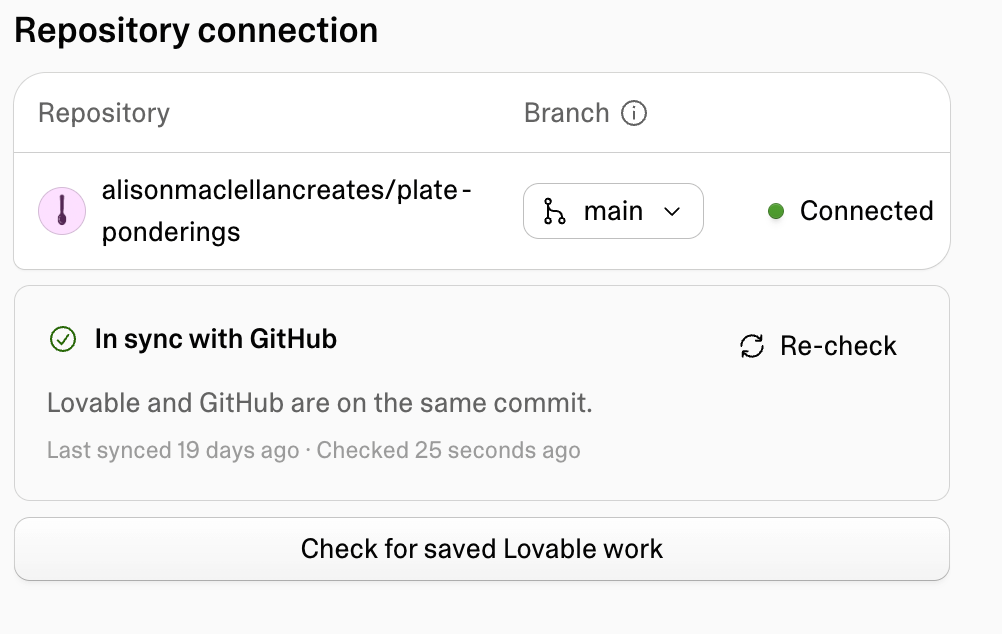
It’s all set. Woo hoo. Now you can push the publish button. It’s blue, not red. But it is the same feeling. Never hit the big red button. If you have done things in features, you can publish a feature at a time. Or you can wait until the whole project is done. I like that feeling of “I finished something”. I publish after each feature is complete.
You work through your features, issues become feature branches, a group of issues is a feature, each issue has a pull request until the feature is complete in dev. Then you move the feature to main and release. And now you’re done.
My app can be found here:
Here’s my little demo video.
And here’s my overall stats on what I built
I still have a few outstanding issues to complete, but I built everything I wanted for #SheBuilds. While #SheBuilds was 3 days, I’ve turned it into a month-plus with my preplanning and now my post write-up.
Did I make it in the top 30 or win? No, not even. But that wasn’t my goal. My goal was to try a new way of working while still incorporating the fundamentals I consider important. And I did that. Would what I do fly in a corporate job? Maybe. I probably do more sanity checks than some folks would consider necessary. But honestly, even when I was doing it all by hand that’s how I worked. In data work, once something is wrong, people lose trust in your answers.
When I look at the definition of vibe coding, I recognize what I do doesn’t necessarily align. But for me, it’s very hands off compared to any other coding I’ve done, so I’m sticking with that name. I let the AI do the validation by using multiple AI. I’m just there to steer the ship. And in many ways it aligns with how I’ve worked as a manager. I provide direction and guard rails with the occasional check in, but I trust others to do the work.
And my real win here? My husband asked to look at my repository. He told me it was well organized and he could follow what I’d done. That means I’ve built something others can understand. That means someone else can pick it up and make changes. It’s not just me.
What would I do differently for #SheBuilds? More social time. I didn’t participate in the Slack channel in a meaningful way. I was very focused on the build. I worked as a typical dev at a desk where someone shoves pizza under the door. And that really wasn’t the goal of #SheBuilds, it was to support others in learning and growing. Hopefully this series makes up for that gap. Maybe in the next #SheBuilds someone will find this series and it will help them plan their project.
But they should know, this is just one way to build, the one that works for me. There is no one right way to do things. Find what works for you and follow it!
I shared alot in this series. I have added a 10th essay with a link to resources mentioned throughout the series.
Glossary
Accessibility (A11y): making sure an app works for everyone, including people using screen readers or keyboards
Admin (administrator): the person who runs the site, blocking spam, clearing issues, and keeping things running
Anonymize: to remove anything that connects data to a specific person
Bot: an automated account that acts on its own, like a named reviewer leaving comments
Branch: a separate copy of the project where you can make changes without touching the main version
Brief: a written description of the product. Names, fields, limits, rules. No code.
Check in: saving your changes to the repository
Code coverage: how much of your code is exercised by your automated tests
Code review: someone else reading your changes before they’re merged, looking for problems
Commit: a saved set of changes in a branch
Continuous integration (CI): automatically building and testing every change as soon as it’s submitted
Dev branch: the working branch. What it holds is what you see on the preview site.
Diff: the lines that changed between two versions of the code
End to end (E2E): the full journey through the app, from first screen to last
Entity: one kind of thing the database stores, like a plate, a story, or a user
ERD (entity relationship diagram): a picture of the entities and how they connect
Feature branch: a short-lived branch for one piece of work, named for its step
GitHub: a website for storing projects, their history, and the work planned for them
GitHub Copilot (GHCP): GitHub’s built-in AI assistant, which can review pull requests
Hello world: the simplest possible starter program, traditionally a page that just says hello
Hero image: the large image at the top of a page
Issue: a single task tracked in GitHub. In this series, each issue is one step.
Label: a tag on an issue that tells you something about it at a glance. Mine say who does the work.
Memory: what Rowan and Lovelace pick up over time from working with me
Merge: bringing the changes from one branch into another
Merge conflict: when two branches change the same lines differently, and someone has to decide which version wins (new)
Milestone: a group of issues that together complete something larger
Palette: the set of colors a design is allowed to use
Preview site: a private copy of your site built from the dev branch, for checking work before publishing
Production: the live version of your app, the one the world sees (new)
Project knowledge: the place in Lovable where the brief lives, read by Sully with every prompt
Prompt: the instructions you give an AI to do a piece of work
Proof of concept: a quick, rough build to see whether an idea works
Publish: to make the site live for everyone, built from the main branch
Pull request: a request to move changes from one branch into another, so they can be checked and reviewed first
Push: sending your commits up to GitHub
Regenerate: when an AI image tool redraws the whole image instead of changing one part
Regression: an error in something that was previously working
Release: sending a finished set of changes out to production (new)
Remix: Lovable’s way of starting a new project from an existing one
Repository (repo): where a project’s files and history live in GitHub
Role: a label on an account, like admin, that decides what that person can see and do
Ruleset: a set of GitHub rules protecting a branch, such as requiring a pull request for every change
Sandbox: a safe, separate space to run code without affecting anything real
Schema: the blueprint for a database: what things it stores and how they connect
Seed data: a starting set of data loaded into a new database
Source code management (SCM): a system for storing code and tracking every change to it
Static page: a page that looks real but doesn’t do anything yet
Storyboard: the set of screens showing how a user moves from page to page
Telemetry: data an app collects about how it’s used and what it was doing when something went wrong
Test harness: the automated tests and checks that run on every change to confirm nothing broke
Token: the unit AI tools use to measure text, and often to charge for it
Vibe coding: building software mostly by directing AI in plain language rather than writing code yourself (new)
Visual guide: a single page showing every color, style, and component the app uses