

This is a 9-part series outlining the way I worked for #SheBuilds.
If you’re curious where I started, check out Part 1: Show Me Your Prompts

Before I build anything, I draw. Generally my drawings focus on the data structures, how the different entities relate to one another. It then helps me build a database that will perform well and provide all the data the application needs without boxing myself into any corners. I rarely would design the UI, that would be a designer. But with AI, I’m able to doodle the whole thing.
Why do I spend the time doing all the screens and interactions before I build? Because a picture is easy to change. Changing code creates wasted work, and too often causes regressions. A regression is creating an error in something that was previously working. And frankly, I prefer to avoid wasted work and regressions.
By building the screens ahead of time, I find problems earlier in the process. I don’t like surprises. Realizing I’ve built 75% of a feature only to be missing key interactions or screens is frustrating. It means going back to review my plan, seeing what else is impacted by that change, and generally makes me grumpy.
Designing What The Plate?, I was planning just a simple site with license plates and stories. I wanted it to look attractive and allow for historical review of stories created by people about plates. While I was designing the screens for PawPrint, I came up with the idea to add a ‘Pet Of The Day’. I realized how that could be a great feature in What the Plate? Since I had not started to build anything, it was a simple change to the screens to highlight the plate and then an additional screen to look at the history of Plate Of The Day. In this way, the design changed the product.
The design process begins with a discussion with Rowan (ChatGPT) about my goals for the site, how I want it to feel. After a bit she came back with her suggestions:
I’d like to explore three visual treatments of What the Plate? side by side:
The Road Trip: Vintage Americana, warm cream, teal, coral, and a little nostalgia.
The Curious Collector: Editorial typography, illustrated plates, playful details, and a more sophisticated palette.
The Modern Mischief: Bold typography, confident colors, clever license plate graphics, and a contemporary personality.
They all sounded interesting, so I asked her to build them.
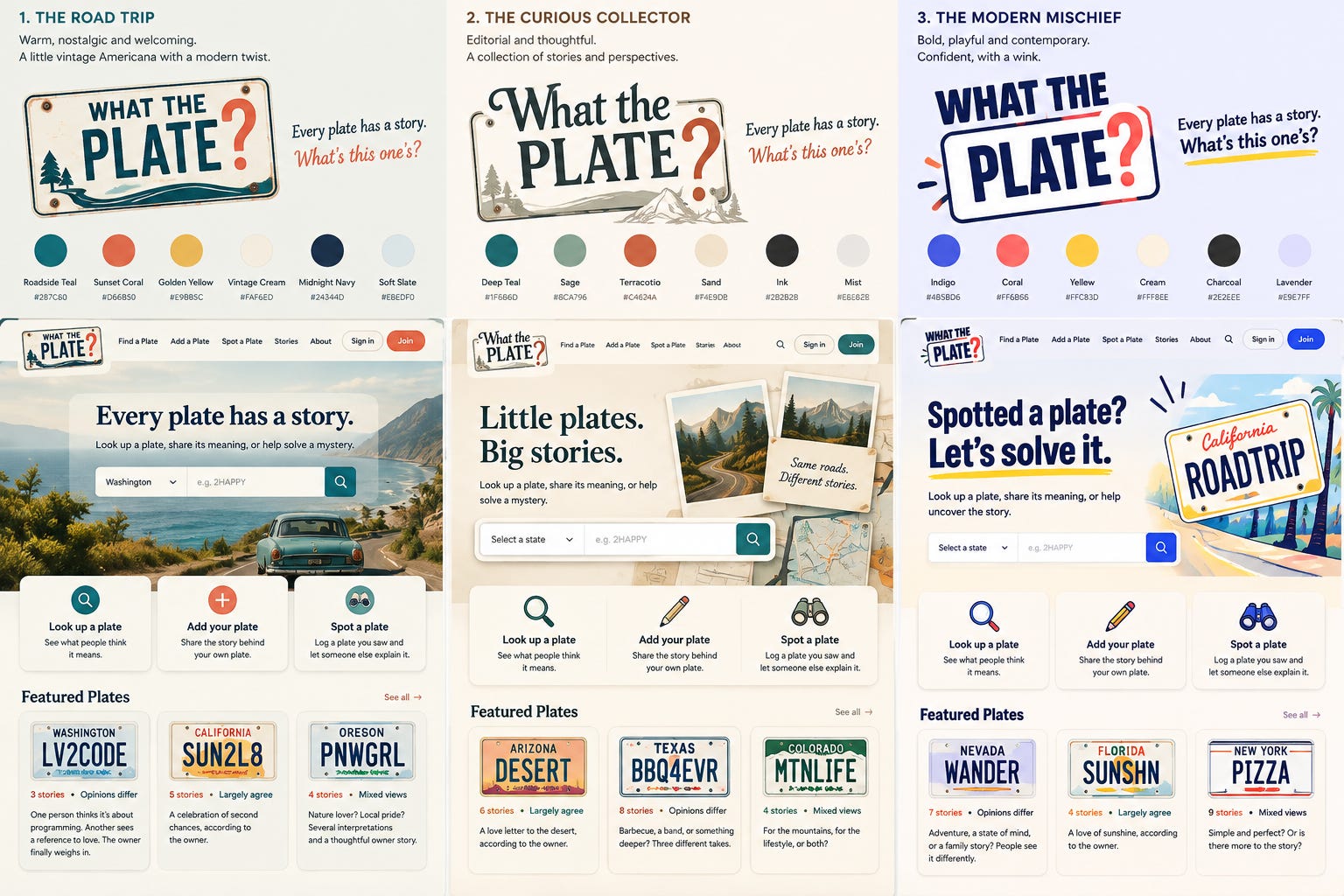
I showed these to my husband and he commented what he liked best was the 3 different lines in the hero image. He thought it would be interesting to rotate them. I passed this back to Rowan and once again, the design changed the product. We walked through a few other items such as, should the plates look like actual plates or should it be a representation. This is when I learned that some license plate designs are licensed, so recreating them is a no-no.
For the license plates we decided to create a side quest to see what it would take to make plates that looked similar to a standard plate but not the plate. We wrote it up as a stretch goal and handed it to a different set of agents to work on in the background and we’d add it if there was time.
We landed on the homepage including the mobile representation.
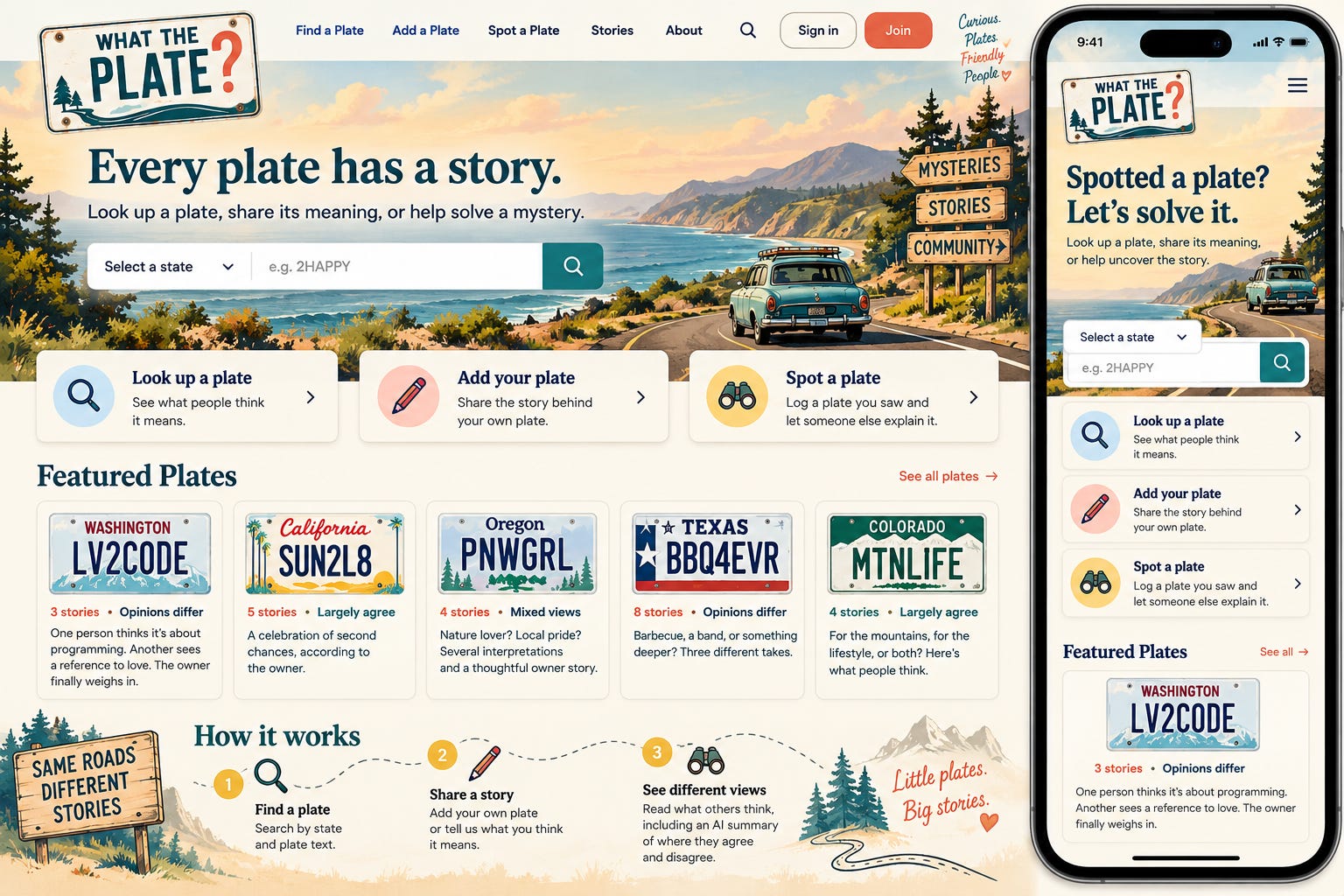
I shared it with Lovelace (Claude) and she provided direction back to Rowan, and we had a slight set of tweaks.
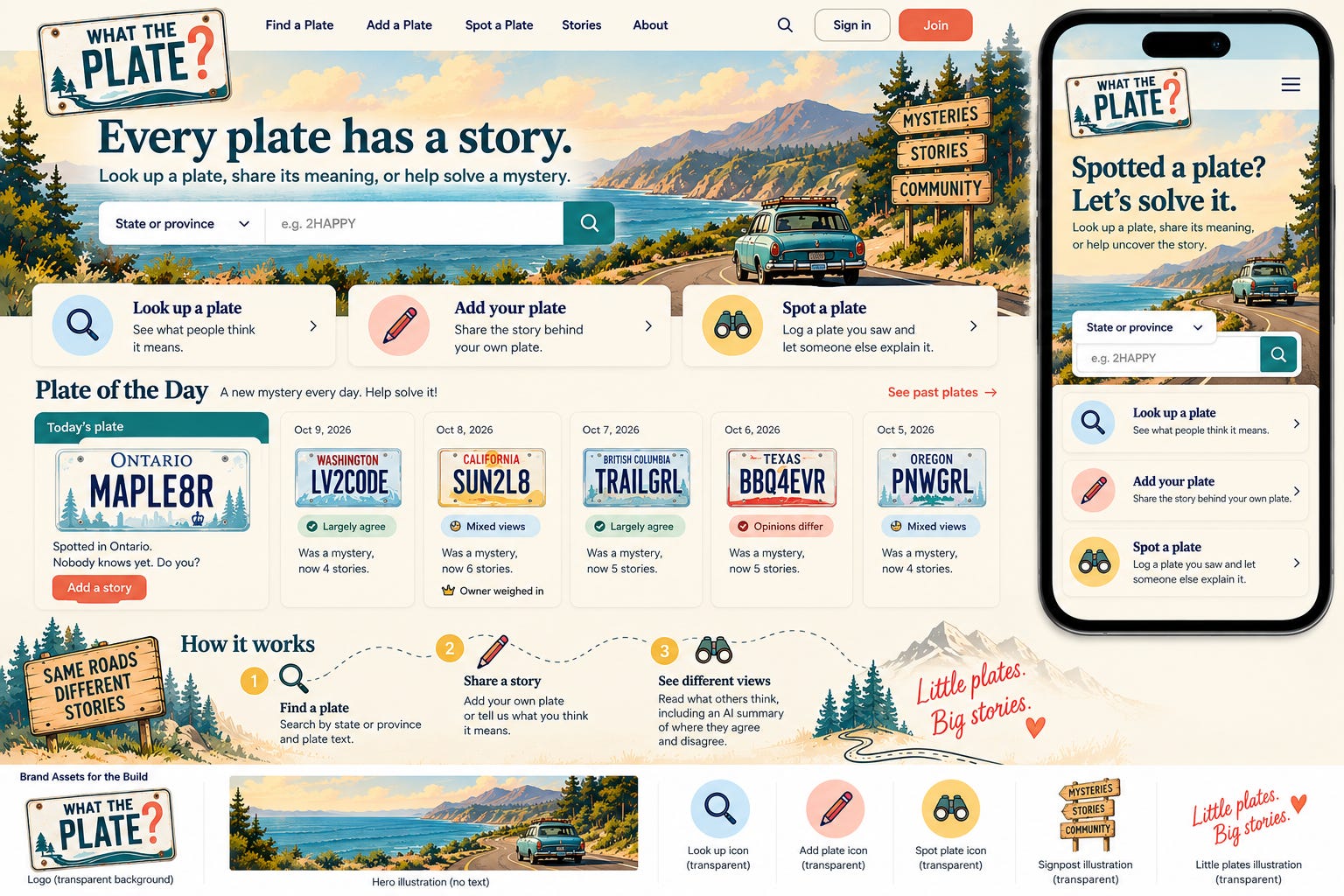
By this time we had our palette and home page and we could start working through all the other pages. The key with #SheBuilds is even with all these screenshots, I couldn’t share them with Sully (Lovable). Everything had to be described for Sully to interpret and implement. It actually was a good exercise and I think I’ll continue to work this way.
While we were working on the design of the other pages, all of a sudden I noticed purple was showing up in the designs, not our set color palette. I asked Rowan “Where did all the purple come from?” She said, oh, you’re right, that’s not in our approved palette. A simple question, she was able to reference memory and we quickly pivoted. We all know that our AI can drift, so it’s important to watch and adjust.
When an image needs to change, you want to make sure to direct it to only change exactly what you want changed, otherwise it will fully regenerate the image and you may lose things you liked. I start my image prompts for tweaks with “don’t regenerate this image, only change this one thing X, keep everything else the same”. This also works for images where you want to use the same base image. I do this for my Musings from Alchemist Manor where I change the porch for the season. I also did it for the roadmap for this essay.


We use an approval process for the design the same as I would if I was working with a human partner. I describe, Rowan draws, I provide feedback, Rowan adjusts, Lovelace provides feedback, Rowan adjusts, design is approved. Although there were times we didn’t need to regenerate the image. We had one section with a privacy checklist. It had a green checkmark indicating the application had verified faces and addresses were blurred. Unfortunately, they weren’t. So rather than regenerating the screen, we changed the written design to ask the human to verify the image was blurred. Again, the design changed the product.
When we were done, we had a storyboard with a full E2E flow of the application. A storyboard tells us about the flow from page to page, and by defining the full E2E (End to End) process, we found gaps, things the application would need to track before we ever started creating code.
Out of all those screens came our visual guide: the plates, the badges, the buttons, every color in one place.
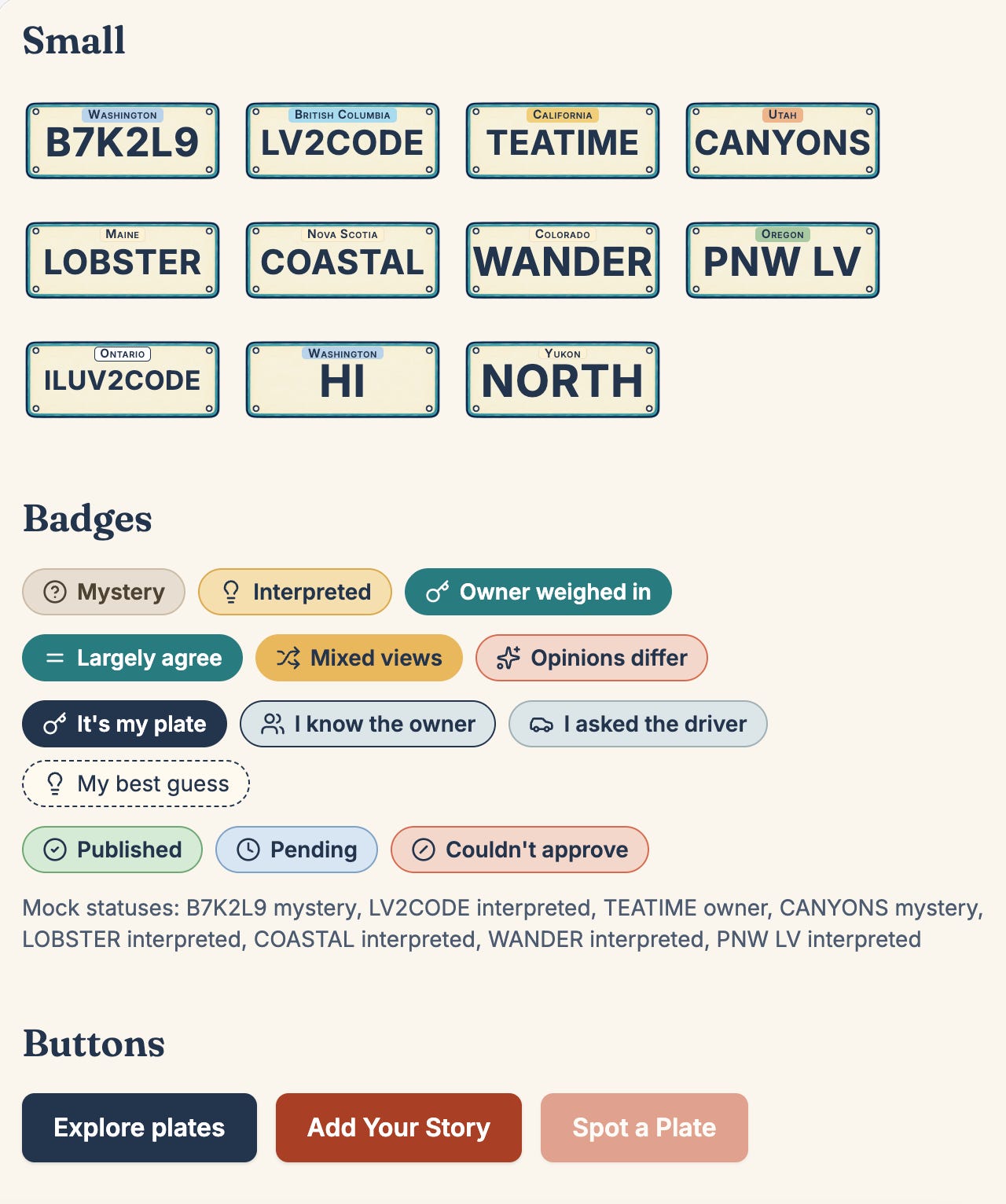
The design changed the product again and again, and every change happened before any code was created.
Now it’s time to build the prompts. Tomorrow, Lovelace joins us for more than just approvals.
Glossary
Branch: a separate copy of the project where you can make changes without touching the main version
Brief: a written description of the product. Names, fields, limits, rules. No code.
End to end (E2E): the full journey through the app, from first screen to last (new)
Hero image: the large image at the top of a page (new)
Issue: a single task tracked in GitHub. In this series, each issue is one step.
Memory: what Rowan and Lovelace pick up over time from working with me
Palette: the set of colors a design is allowed to use (new)
Project knowledge: the place in Lovable where the brief lives, read by Sully with every prompt
Regenerate: when an AI image tool redraws the whole image instead of changing one part (new)
Regression: an error in something that was previously working (new)
Repository (repo): where a project’s files and history live in GitHub
Storyboard: the set of screens showing how a user moves from page to page (new)
Test harness: the automated tests and checks that run on every change to confirm nothing broke
Token: the unit AI tools use to measure text, and often to charge for it
Visual guide: a single page showing every color, style, and component the app uses (new)