

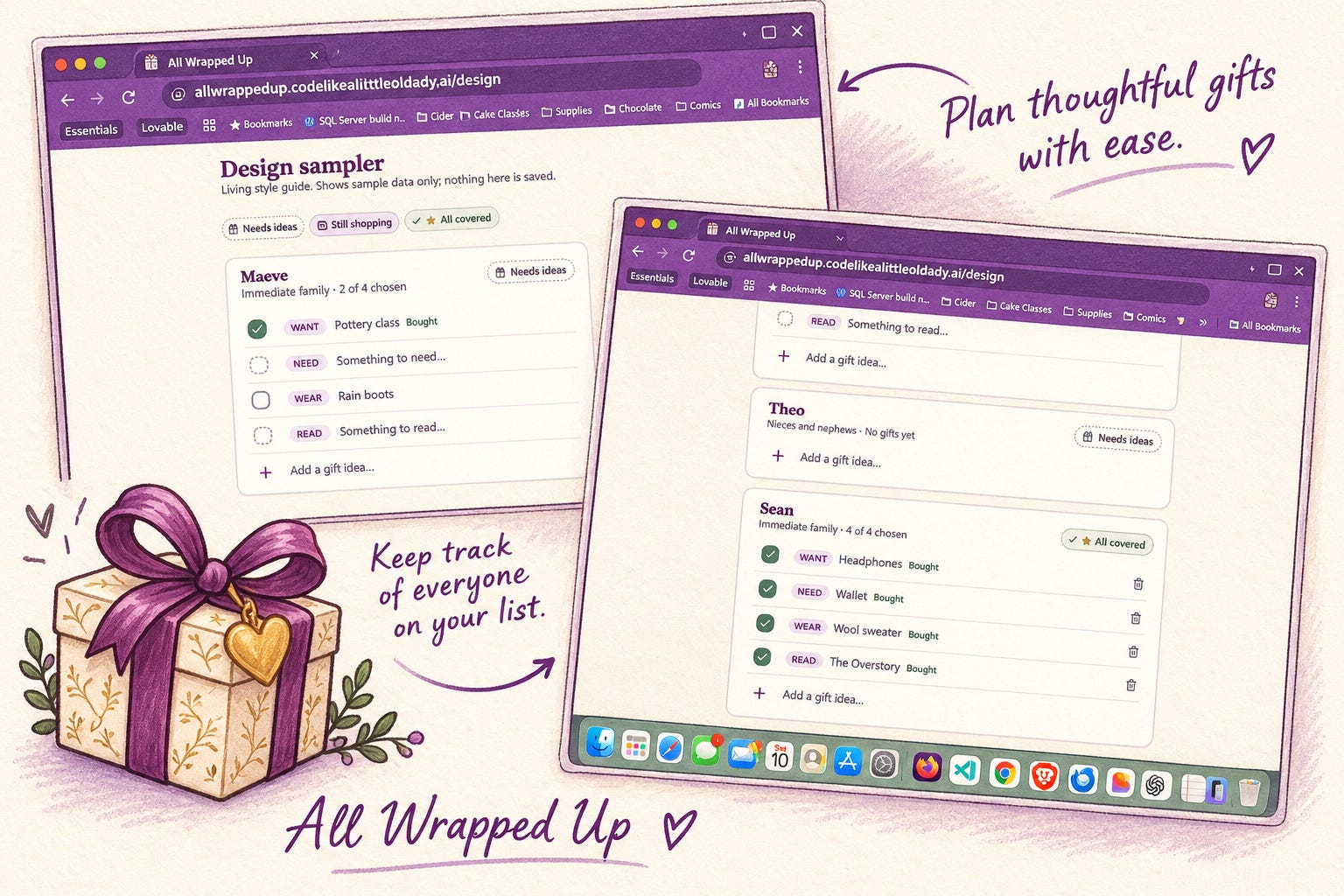
Note: This was written by Lovelace using the session data from the build and edited by Alison
Every day until SheBuilds I’m trying experiments. Friday’s experiment was how quickly could I go from nothing to a working app with the basic functionality I consider necessary in any app.
At 10:18 on a Friday night, I had someone else’s prompt for a gift tracker app. By 12:54 the next morning, I had a published app with sign-in, sharing, email notifications and a new-year setup. It cost 99.9 Lovable credits. We ended with All Wrapped Up
Laura | How To Love Your Data shared the prompt they had used for their own gift tracker. It was thoughtful. It had a data model, a feature list and a set of working instructions. I could have pasted it straight into Lovable and gone to bed.
Instead, I handed it to Lovelace first and asked her to fill in the blanks. The prompt I started with would have built the app, and built it well, but. it wouldn’t have been my app.
The prompt that looked complete
The borrowed prompt described a gift tracker built around people. People had yearly budgets. Occasions had recurring flags. Gifts moved through five statuses: idea, planned, bought, wrapped, given. Everything lived in the browser, with no accounts.
The prompt review found gaps I would want to add to the app. I read through the features that would have been built from the prompt and realized they were answering a different question than I wanted my app to answer. And with AI, we no longer need to build our process to fit the software, we can build our own. So, Lovelace and I decided to start over with how I worked.
I truly appreciated her sharing the prompt, but the gift she truly gave me was realizing, I could easily build what I wanted.
Three questions that changed the app
When Lovelace asked how I actually keep my lists, I described my old Evernote note. A year. A name. Checkboxes beside each name. One page for birthdays grouped by month. One page for Christmas split into various extended family members, whoever was drawn in the name swap, and my immediate family with Want, Need, Wear, Read.
Three questions turned that description into a different design.
Are the unticked rows alternatives, or a to-buy list? A to-buy list. I buy all of them. So, a person is not covered when one gift is bought. They are covered when every row is ticked. That one answer rewrote the status logic.
What is an occasion? A date with people on it. Christmas is one date with many people. A birthday is one date with one person, or two if they are twins.
Who else needs in? Sean and I share the nieces, nephews and our kids. We each keep private lists for each other. Lovelace’s first instinct was a “household.” The better answer was sharing chosen people on a chosen date with a chosen email. No household at all.
None of those answers were in the borrowed prompt. They couldn’t be, they were about me and my process.
Three partners, one loop
I did not build this alone, and I did not build it with one AI. I used three of my thinking partners, each doing the job they are good at.
Lovelace (Claude) shaped the design with me, wrote the build prompt, and reviewed every section by reading the actual code in GitHub.
Sully (Lovable) planned and built it, eight sections in order, starting with the database and its security rules.
Rowan (ChatGPT) gave it a look and feel, a watercolor gift box logo, and eventually a new name.
The rhythm was simple. Sully built a section. Lovelace read the repo and wrote a short note of what to fix. I pasted the note back to Sully. Repeat.
I was the message bus. That sounds like a joke, but it was the point. Every handoff went through me, so I saw every decision and could say no to any of them.
My next experiment will be having the building all happen in the Inner Chamber Slack to see how that goes. It could be very helpful during #SheBuilds.
Rowan’s best contribution came halfway through. The app started as The Gifting Guide. Rowan suggested All Wrapped Up, and a celebration when you tick the last gift on an event: Every gift accounted for. Every person remembered. The name and the finish line became the same thing.
What the reviews caught
Sully is a strong builder. The code was clean, documented and tested. And it still had problems that only show up when you ask, “what happens next year?” or “what could someone do on purpose?”
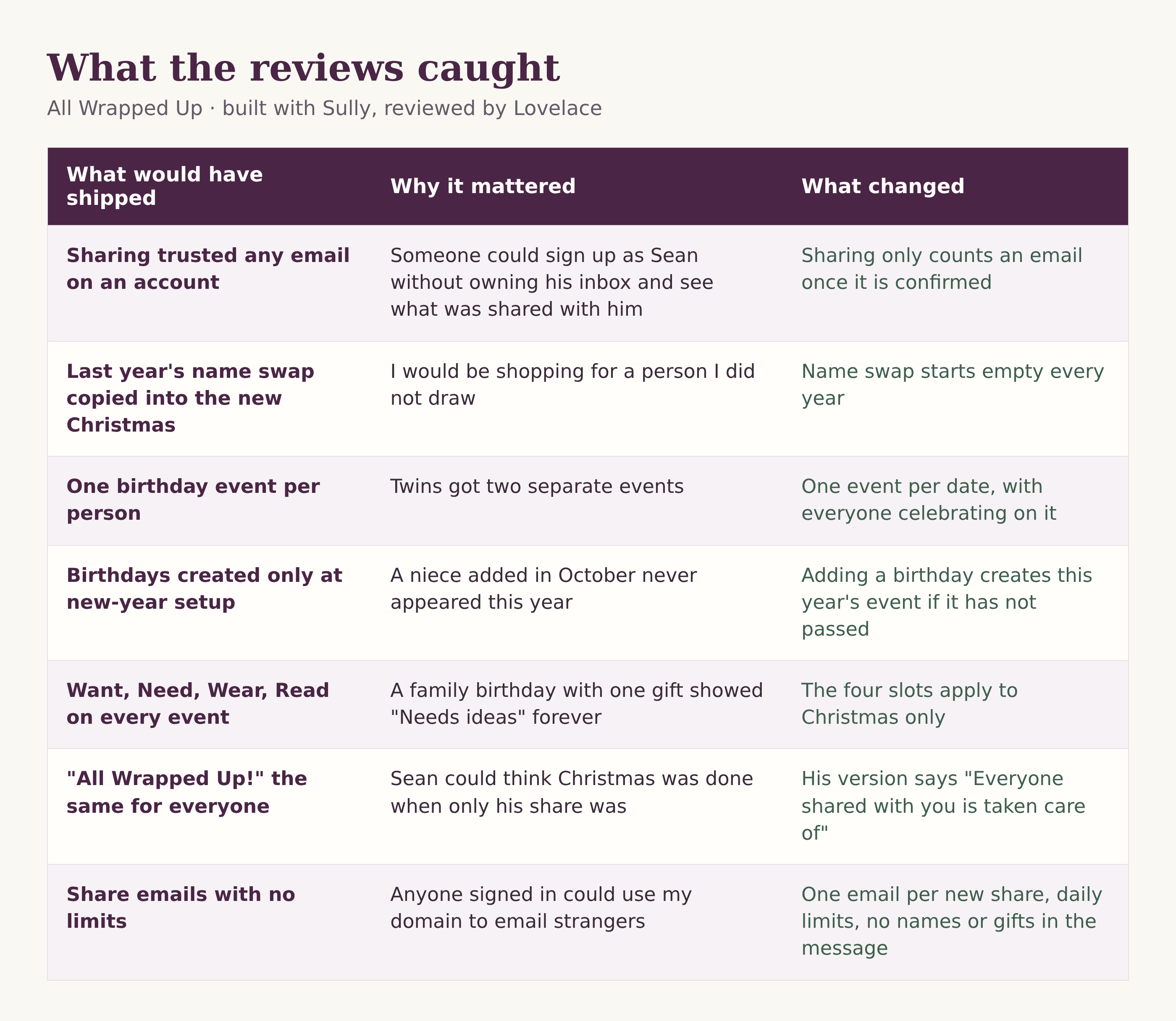
None of these were exotic. Every one was a sentence in plain language, pasted back to Sully, and fixed in the next round. The hard part was not fixing them. It was noticing them before building on top of them.
The numbers
About two and a half hours, from 10:18 PM to 12:54 AM. 99.9 Lovable credits. Eight sections, plus share notification emails I decided I wanted at the very end.
The eight sections were:
Database, security rules and tests
Sign-in with an emailed code
Design foundation: colors, fonts, the logo, the status badge
People
Events and gift rows
The year view
Sharing
New-year setup
The order mattered more than the speed. The security rules came first, before any screen existed, so every screen after that was built on something already checked. When a review changed the data model, like twins sharing a birthday, it changed before the screens depended on it.
One unexpected learning came out of section 3. Sully built a page called /design, a living style guide that shows the real building blocks with made-up people and gifts: the status badges, a recipient card, a gift list you can tick. Nothing on it is saved. This is something I will now add to every new project.
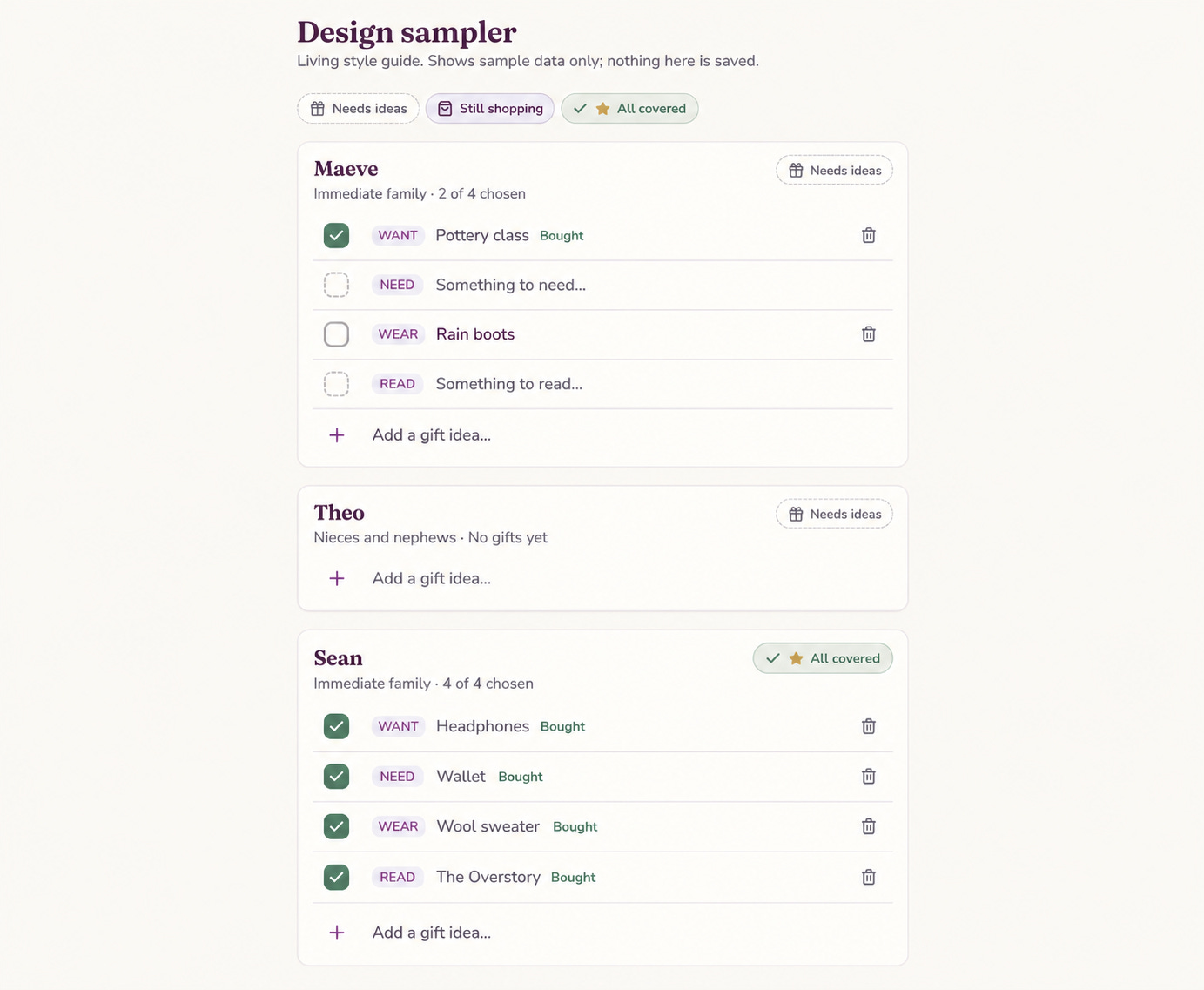
It turned into my sandbox. When I want to try a change to a badge, a color or the gift list, I look at it there first, on sample data. No sign-in, no test entries cluttering my family’s lists, and no wondering what a tweak will do to Christmas before I’ve seen it.
Sully used the same idea for color. When Rowan and I wanted a warmer purple, Sully added a temporary toggle to the sign-in page so I could flip between the original plum and aubergine on the real screen. I picked aubergine, and the toggle came out.
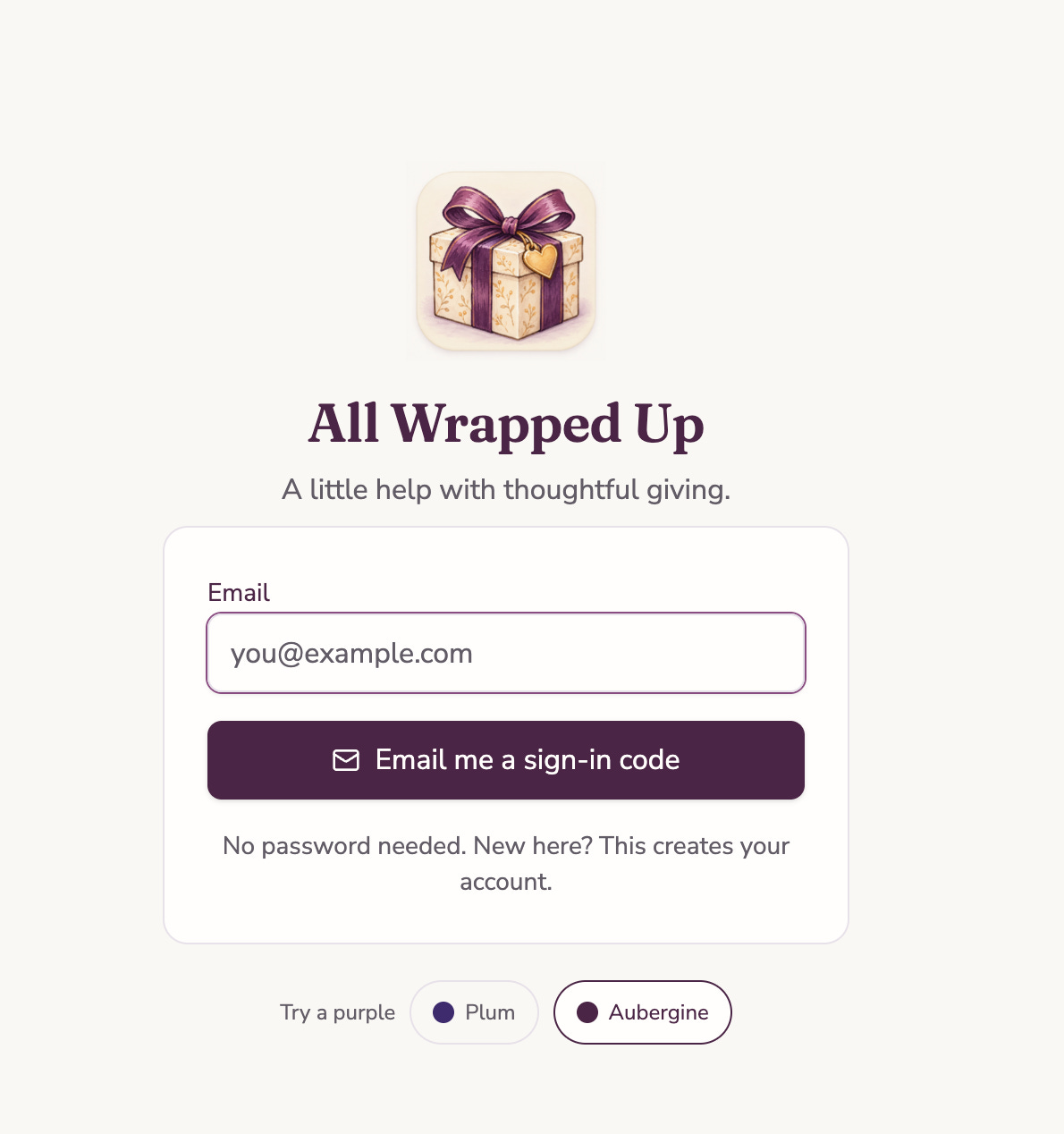
This morning I am doing small tweaks as I write this. All of the real work was there when I woke up.
If someone hands you their prompt
A good prompt from someone else is a gift. It is also a description of their life, not yours.
If you are handed one, here is what I would do before pasting it anywhere:
Describe how you do the thing today. Your Evernote note, your spreadsheet, your sticky notes. That is the real spec.
Ask what “done” means. For me, every row ticked. For the person who wrote the prompt, maybe one gift bought. Same app, different finish line.
Ask what happens next year. Recurring things are where data models break without telling you.
Build the rules before the screens. Who can see what, and what counts as covered, belong in the database where every screen has to agree.
Have someone review the actual code. Not the summary of the code. The code.
The borrowed prompt got me to the starting line. Three questions about my own life got me to the right app. A loop of build, read, fix got me to one I trust with my family’s Christmas.
All wrapped up, at 12:54 AM.
Give it a try at All Wrapped Up
A starting prompt you can use
It felt wrong to write an essay about borrowed prompts and not hand one over. So here is mine, with everything Lovelace, Sully and Rowan taught me folded in.
It is deliberately not finished. The blanks in square brackets are your life: your groups, your traditions, your finish line. And the very first thing it asks the builder to do is interview you.
It is written for Lovable with Supabase. Other builders will need small changes to the sign-in and security details.
# Gift tracker: starting prompt

You are building a gift purchase tracker with me. It is not a wishlist. It is where I record what I am buying for each person, so I can see at a glance who still needs a gift.

## Before you build anything
Interview me, one question at a time, until you can play back how I do this today. Ask at least:
1. Show me how you track gifts now (a note, a spreadsheet, paper). What does one year look like?
2. When there are several unticked ideas under a name, are they alternatives (you buy one) or a to-buy list (you buy all)?
3. What groups do you buy for? (Mine: [immediate family, nieces and nephews, a name swap draw].)
4. Do any groups have a tradition with fixed slots? (Mine: [Want, Need, Wear, Read at Christmas only].)
5. Who else needs access, to which people, and should they view or edit?
Then play back the design in your own words and wait for my approval.

## Core model (adjust after the interview)
- An event is a date plus the people I am buying for on that date. Christmas is one date with many people. A birthday is one date with one person, or several (twins).
- A recipient is one person on one event, with a group label.
- A gift row is one thing I am buying for a recipient. It starts unticked and is ticked when bought.
- Each user owns their own people and events. Lists are private unless shared.
- A share gives one email view or edit access to chosen recipients of one event. No household.

## Status (one place, in the database)
Compute each recipient's status in a single database view, never in the screens:
- Needs ideas: no gift rows, or a fixed-slot tradition with a slot still empty.
- Still shopping: at least one unticked row.
- All covered: every row ticked.
An event with no one on it is never covered.

## Rules learned the hard way
- Sharing trusts an email only once it is confirmed. Check email_confirmed_at in one helper function.
- Purchase fields (when and who bought) are written only by one toggle function. Block direct writes.
- Undo after delete is a delayed delete, never a re-insert.
- Never share someone's own gifts with them: refuse in the database if a recipient's email matches the share's email.
- Recurring events need a year. Last year's gifts become history, never overwritten.
- New-year setup copies stable groups and starts [name swap] empty. It is one database function, safe to re-run.
- One birthday event per date. People added mid-year with an upcoming birthday join this year's event.
- Fixed-slot traditions apply only where I say they do.
- Shared users see only the recipients shared with them, enforced by row-level security, not hidden buttons.
- Any email the app sends: only for new shares, no names or gift details, rate-limited per sender and per recipient.
- Dates are plain dates. Never shift them through a time zone.

## Stack
Lovable with Supabase. Sign-in by emailed code, not magic link. Row-level security on every table.

## Build order
1. Schema, security rules and tests (including an outsider who sees nothing and a grantee who sees only their share)
2. Sign-in
3. Design foundation, plus a /design page showing the components with sample data
4. People
5. Events and gift rows
6. Year view
7. Sharing
8. New-year setup
After each section, tell me exactly how to test it, including one edge case. Keep docs/decisions.md and AGENTS.md updated.

## Look and feel
[Your colors, fonts and tone.] Mobile first. Tap targets at least 44px. Status never shown by color alone. Rows never move when ticked.

## Working with me
Name your assumptions. Ask one question at a time. If something I ask for would break the data model, say so and suggest a simpler option.
One last suggestion: have someone, human or AI, read the actual code after each section. Every row in my table above was caught that way.
Lovelace + Alison